> ## Documentation Index
> Fetch the complete documentation index at: https://docs.multisynq.io/llms.txt
> Use this file to discover all available pages before exploring further.
# Multiblaster Game Tutorial
> Build a complete multiplayer game step-by-step with Multisynq - from asteroids to spaceships, shooting, scoring, and persistence
This comprehensive tutorial will guide you through building a complete multiplayer game using Multisynq. You'll learn how to create a 2D space game with asteroids, spaceships, shooting mechanics, collision detection, scoring, and persistence.
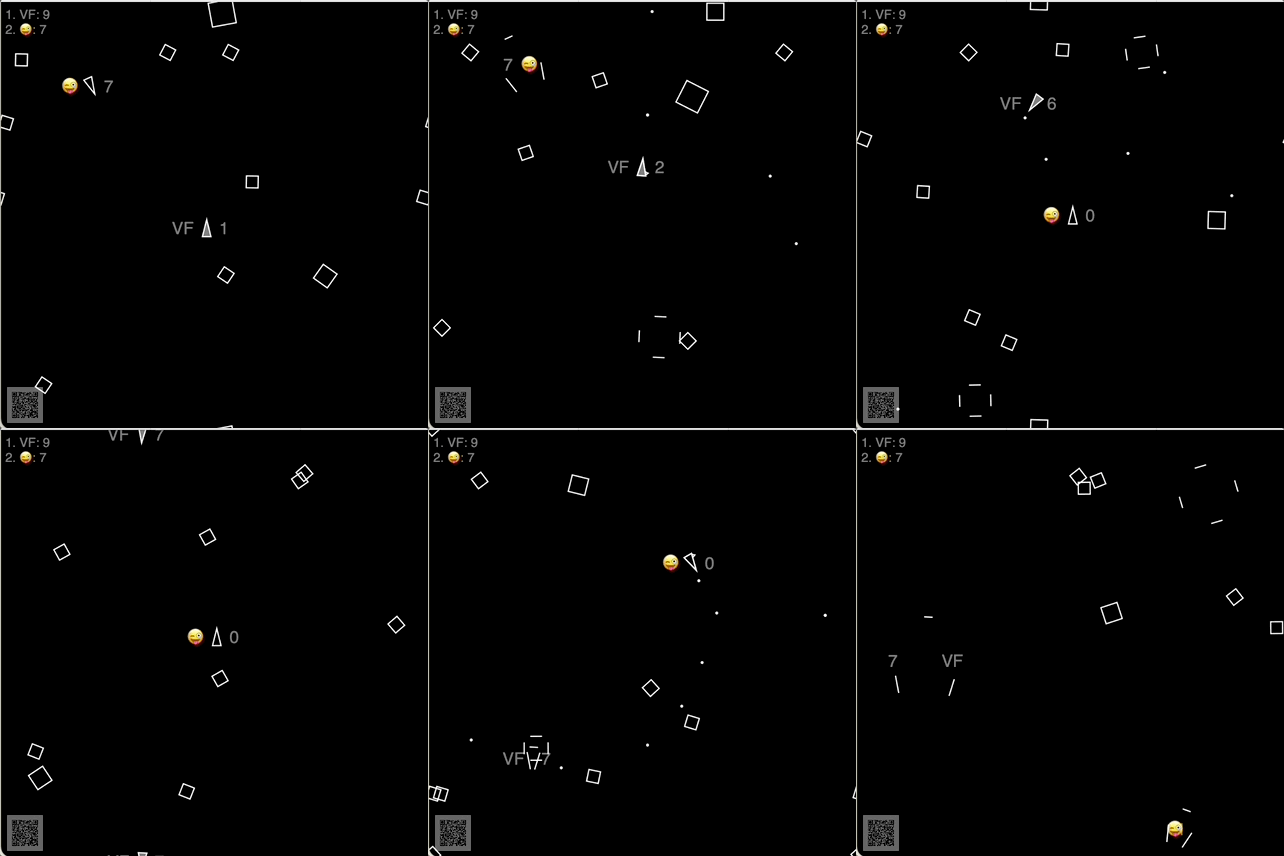 [**Click here to play the full game**](https://multisynq.github.io/multiblaster-tutorial/step9.html) - then scan the QR code or share the generated session URL to invite other players!
## Tutorial Overview
This tutorial is structured as a progressive series of steps, each building upon the previous one. You'll start with a simple asteroid simulation and end with a fully-featured multiplayer game:
1. **Step 0**: Basic asteroids (non-Multisynq)
2. **Step 1**: Synchronized asteroids with Multisynq
3. **Step 2**: Interactive spaceships with player controls
4. **Step 3**: Shooting mechanics with blasters
5. **Step 4**: Collision detection and asteroid destruction
6. **Step 5**: Ship-asteroid collisions and debris
7. **Step 6**: Scoring system
8. **Step 7**: View smoothing for 60fps animation
9. **Step 8**: Persistent highscore table
10. **Step 9**: Mobile support and final polish
Each step includes **full source code** and a **live demo** so you can see the progression and test each feature as you build it.
## Game Features
The finished game includes:
* **Multiplayer synchronization** - All players see the same game state
* **Player-controlled spaceships** - Arrow keys or WASD for movement
* **Shooting mechanics** - Space bar to fire blasters
* **Collision detection** - Blasters destroy asteroids, asteroids destroy ships
* **Scoring system** - Points for destroying asteroids
* **Persistent leaderboard** - Highscores survive code changes
* **Mobile support** - Touch controls for mobile devices
* **Smooth animation** - 60fps rendering with view smoothing
* **QR code sharing** - Easy session sharing between devices
## Step 0: Asteroids Floating Without Multisynq 🪨≠🪨
* [**Full source code**](https://github.com/multisynq/multiblaster-tutorial/blob/main/step0.html)
* [**Live demo**](https://multisynq.github.io/multiblaster-tutorial/step0.html)
This is a non-Multisynq app showing asteroids floating through space. If you run this in two windows, the asteroids will move differently - they're not synchronized.
Each asteroid has position (`x`, `y`) and angle (`a`) properties, along with delta values (`dx`, `dy`, `da`) for movement:
```js theme={null}
move() {
this.x = (this.x + this.dx + 1000) % 1000;
this.y = (this.y + this.dy + 1000) % 1000;
this.a = (this.a + this.da + Math.PI) % Math.PI;
setTimeout(() => this.move(), 50);
}
```
The `%` operator ensures objects wrap around the screen edges - when they leave one side, they appear on the other.
Drawing is done with simple white strokes on a 1000×1000 canvas:
```js theme={null}
for (const asteroid of asteroids) {
const {x, y, a} = asteroid;
context.save();
context.translate(x, y);
context.rotate(a);
context.beginPath();
context.moveTo(+40, 0);
context.lineTo( 0, +40);
context.lineTo(-40, 0);
context.lineTo( 0, -40);
context.closePath();
context.stroke();
context.restore();
}
```
**This file has about 80 lines of code total.**
## Step 1: Asteroids Synchronized with Multisynq 🪨≡🪨
* [**Full source code**](https://github.com/multisynq/multiblaster-tutorial/blob/main/step1.html)
* [**Live demo**](https://multisynq.github.io/multiblaster-tutorial/step1.html)
Now we add Multisynq synchronization! The asteroids will move exactly the same in all browsers and devices.
The app is divided into two parts:
* **Model**: The synchronized part (`Multisynq.Model`) - shared computation
* **View**: The display part (`Multisynq.View`) - local rendering
```js theme={null}
class Asteroid extends Multisynq.Model {
move() {
this.x = (this.x + this.dx + 1000) % 1000;
this.y = (this.y + this.dy + 1000) % 1000;
this.a = (this.a + this.da + Math.PI) % Math.PI;
this.future(50).move(); // ← Key difference!
}
}
```
```js theme={null}
class Display extends Multisynq.View {
update() {
// Drawing code exactly the same as Step 0
for (const asteroid of this.model.asteroids) {
const { x, y, a, size } = asteroid;
// ... drawing code ...
}
}
}
```
**Critical concept**: The computation looks exactly the same! No special data structures are needed. The only change is `this.future(50).move()` instead of `setTimeout()`.
### Future Messages
The key innovation is the `future()` method:
```js theme={null}
this.future(50).move();
```
This schedules the `move()` method to be called again in 50ms, but **synchronously** across all clients. This is how you define an object's behavior over time in Multisynq.
### Session Joining
The last few lines connect to a Multisynq session:
```js theme={null}
Multisynq.Session.join({
appId: "your-app-id",
password: "your-password",
name: "multiblaster-tutorial",
model: Game,
view: Display
});
```
**This version has only 20 lines more than the non-Multisynq version from Step 0.**
## Step 2: Spaceships Controlled by Players 🕹️➡🚀
* [**Full source code**](https://github.com/multisynq/multiblaster-tutorial/blob/main/step2.html)
* [**Live demo**](https://multisynq.github.io/multiblaster-tutorial/step2.html)
Now we add interactive spaceships! Each player gets their own ship when they join.
### Player Management
The game subscribes to join/exit events to manage players:
```js theme={null}
class Game extends Multisynq.Model {
init() {
this.ships = new Map();
this.subscribe(this.sessionId, "view-join", this.viewJoined);
this.subscribe(this.sessionId, "view-exit", this.viewExited);
}
viewJoined(viewId) {
const ship = Ship.create({ viewId });
this.ships.set(viewId, ship);
}
viewExited(viewId) {
const ship = this.ships.get(viewId);
this.ships.delete(viewId);
ship.destroy();
}
}
```
### Ship Controls
Each ship subscribes to input events from its specific player:
```js theme={null}
class Ship extends Multisynq.Model {
init({ viewId }) {
this.left = false;
this.right = false;
this.forward = false;
this.subscribe(viewId, "left-thruster", this.leftThruster);
this.subscribe(viewId, "right-thruster", this.rightThruster);
this.subscribe(viewId, "forward-thruster", this.forwardThruster);
this.move();
}
leftThruster(active) { this.left = active; }
rightThruster(active) { this.right = active; }
forwardThruster(active) { this.forward = active; }
}
```
### View Input Handling
The view publishes input events to control the ship:
```js theme={null}
document.onkeydown = (e) => {
if (e.repeat) return;
switch (e.key) {
case "ArrowLeft": this.publish(this.viewId, "left-thruster", true); break;
case "ArrowRight": this.publish(this.viewId, "right-thruster", true); break;
case "ArrowUp": this.publish(this.viewId, "forward-thruster", true); break;
}
};
```
**Key insight**: Publish/subscribe in Multisynq is used for **view-to-model communication**, not for synchronization between devices. The synchronization happens automatically!
## Step 3: Firing a Blaster 🕹️➡•••
* [**Full source code**](https://github.com/multisynq/multiblaster-tutorial/blob/main/step3.html)
* [**Live demo**](https://multisynq.github.io/multiblaster-tutorial/step3.html)
Add shooting mechanics! Press the space bar to fire blasters.
### Blaster Creation
When firing, the ship creates a new blast moving in its direction:
```js theme={null}
fireBlaster() {
const dx = Math.cos(this.a) * 20;
const dy = Math.sin(this.a) * 20;
const x = this.x + dx;
const y = this.y + dy;
Blast.create({ x, y, dx, dy });
}
```
### Blast Lifecycle
Blasts automatically destroy themselves after a timeout:
```js theme={null}
class Blast extends Multisynq.Model {
init({ x, y, dx, dy }) {
this.x = x; this.y = y;
this.dx = dx; this.dy = dy;
this.t = 0;
this.game.blasts.add(this);
this.move();
}
move() {
this.t++;
if (this.t > 30) {
this.destroy();
return;
}
this.x = (this.x + this.dx + 1000) % 1000;
this.y = (this.y + this.dy + 1000) % 1000;
this.future(50).move();
}
get game() { return this.wellKnownModel("modelRoot"); }
}
```
The `wellKnownModel("modelRoot")` pattern provides access to the main game object from any model class.
## Step 4: Break Up Asteroids When Hit by Blasts 🪨➡💥
* [**Full source code**](https://github.com/multisynq/multiblaster-tutorial/blob/main/step4.html)
* [**Live demo**](https://multisynq.github.io/multiblaster-tutorial/step4.html)
Add collision detection! When blasts hit asteroids, they break into smaller pieces.
### Collision Detection
The game runs collision detection in its main loop:
```js theme={null}
mainLoop() {
for (const ship of this.ships.values()) ship.move();
for (const asteroid of this.asteroids) asteroid.move();
for (const blast of this.blasts) blast.move();
this.checkCollisions();
this.future(50).mainLoop();
}
checkCollisions() {
for (const asteroid of this.asteroids) {
const minx = asteroid.x - asteroid.size;
const maxx = asteroid.x + asteroid.size;
const miny = asteroid.y - asteroid.size;
const maxy = asteroid.y + asteroid.size;
for (const blast of this.blasts) {
if (blast.x > minx && blast.x < maxx &&
blast.y > miny && blast.y < maxy) {
asteroid.hitBy(blast);
break;
}
}
}
}
```
### Asteroid Destruction
When hit, asteroids split into two smaller pieces:
```js theme={null}
hitBy(blast) {
if (this.size > 20) {
// Split into two pieces
this.size *= 0.7;
this.da *= 1.5;
this.dx = -blast.dy * 10 / this.size;
this.dy = blast.dx * 10 / this.size;
// Create the other piece
Asteroid.create({
size: this.size,
x: this.x, y: this.y, a: this.a,
dx: -this.dx, dy: -this.dy, da: this.da
});
} else {
this.destroy(); // Too small, destroy completely
}
blast.destroy();
}
```
**Performance insight**: Even with hundreds of moving objects, there's no network congestion because positions are computed locally and synchronized automatically!
## Step 5: Turn Ship Into Debris After Colliding with Asteroids 🚀➡💥
* [**Full source code**](https://github.com/multisynq/multiblaster-tutorial/blob/main/step5.html)
* [**Live demo**](https://multisynq.github.io/multiblaster-tutorial/step5.html)
Add ship-asteroid collisions! When ships hit asteroids, they turn into debris.
### Ship Damage State
Ships track their damage state with a `wasHit` property:
```js theme={null}
move() {
if (this.wasHit) {
// Keep drifting as debris for 3 seconds
if (++this.wasHit > 60) this.reset();
} else {
// Process thruster controls
if (this.forward) this.accelerate(0.5);
if (this.left) this.a -= 0.2;
if (this.right) this.a += 0.2;
}
// ... position updates ...
}
```
### Visual Debris Effect
The view shows exploded ships with scattered line segments:
```js theme={null}
// Normal ship
if (!wasHit) {
this.context.moveTo(+20, 0);
this.context.lineTo(-20, +10);
this.context.lineTo(-20, -10);
this.context.closePath();
} else {
// Exploded ship - segments fly apart
const t = wasHit;
this.context.moveTo(+20 + t, 0 + t);
this.context.lineTo(-20 + t, +10 + t);
this.context.moveTo(-20 - t * 1.4, +10);
this.context.lineTo(-20 - t * 1.4, -10);
this.context.moveTo(-20 + t, -10 - t);
this.context.lineTo(+20 + t, 0 - t);
}
```
The `wasHit` counter determines how far each line segment has drifted from the original position, creating a realistic explosion effect.
## Step 6: Score Points When Hitting an Asteroid with a Blast 💥➡🏆
* [**Full source code**](https://github.com/multisynq/multiblaster-tutorial/blob/main/step6.html)
* [**Live demo**](https://multisynq.github.io/multiblaster-tutorial/step6.html)
Add scoring! Players earn points for destroying asteroids.
### Blast Ownership
Store a reference to the firing ship in each blast:
```js theme={null}
fireBlaster() {
const dx = Math.cos(this.a) * 20;
const dy = Math.sin(this.a) * 20;
const x = this.x + dx;
const y = this.y + dy;
Blast.create({ x, y, dx, dy, ship: this }); // ← Ship reference
}
```
### Scoring System
When asteroids are hit, the firing ship gets points:
```js theme={null}
hitBy(blast) {
blast.ship.scored(); // ← Award points to the shooter
// ... asteroid destruction code ...
}
```
### Score Display
The view displays each player's score and highlights their own ship:
```js theme={null}
update() {
// ... other rendering ...
// Display score next to ship
this.context.fillText(score, 30 - wasHit * 2, 0);
// Fill our own ship to distinguish it
if (viewId === this.viewId) {
this.context.fill();
}
// ... rest of rendering ...
}
```
Players can easily identify their own ship because it's filled instead of just outlined.
## Step 7: View-Side Animation Smoothing 🤩
* [**Full source code**](https://github.com/multisynq/multiblaster-tutorial/blob/main/step7.html)
* [**Live demo**](https://multisynq.github.io/multiblaster-tutorial/step7.html)
Add 60fps animation smoothing! The model updates at 20fps, but we render at 60fps for smooth visuals.
### Why Smoothing?
* **Model**: Updates at 20fps (50ms intervals) for reliable synchronization
* **View**: Renders at 60fps (16ms intervals) for smooth animation
* **Solution**: Interpolate between model positions for smooth rendering
### Smoothing Implementation
Use a `WeakMap` to store rendering positions separate from model positions:
```js theme={null}
class Display extends Multisynq.View {
constructor() {
super();
this.smoothing = new WeakMap();
}
smoothPos(obj) {
if (!this.smoothing.has(obj)) {
this.smoothing.set(obj, { x: obj.x, y: obj.y, a: obj.a });
}
const smoothed = this.smoothing.get(obj);
const dx = obj.x - smoothed.x;
const dy = obj.y - smoothed.y;
// If distance is large, don't smooth (object jumped)
if (Math.abs(dx) < 50) smoothed.x += dx * 0.3;
else smoothed.x = obj.x;
if (Math.abs(dy) < 50) smoothed.y += dy * 0.3;
else smoothed.y = obj.y;
return smoothed;
}
}
```
### Rendering with Smoothing
Use smoothed positions for rendering:
```js theme={null}
update() {
for (const asteroid of this.model.asteroids) {
const { x, y, a } = this.smoothPos(asteroid); // ← Smoothed position
const { size } = asteroid; // ← Direct from model
// ... rendering code uses smoothed x, y, a ...
}
}
```
The smoothing factor of `0.3` works well for 20fps simulation with 60fps rendering, but can be adjusted for different scenarios.
## Step 8: Persistent Table of Highscores 🥇🥈🥉
* [**Full source code**](https://github.com/multisynq/multiblaster-tutorial/blob/main/step8.html)
* [**Live demo**](https://multisynq.github.io/multiblaster-tutorial/step8.html)
Add persistent highscores that survive code changes!
### Understanding Persistence
* Multisynq automatically saves session state
* State persists when all players leave
* BUT: Code changes create new sessions
* Use `persistSession()` to save JSON data
* Data survives code changes
* Passed to `init()` of new sessions
### Player Initials
Add an input field for player names:
```js theme={null}
initials.onchange = () => {
localStorage.setItem("io.multisynq.multiblaster.initials", initials.value);
this.publish(this.viewId, "set-initials", initials.value);
}
// Auto-restore from localStorage
if (localStorage.getItem("io.multisynq.multiblaster.initials")) {
initials.value = localStorage.getItem("io.multisynq.multiblaster.initials");
this.publish(this.viewId, "set-initials", initials.value);
}
```
### Highscore Management
Initialize highscores from persistent data:
```js theme={null}
class Game extends Multisynq.Model {
init(_, persisted) {
this.highscores = persisted?.highscores ?? {};
// ... other initialization ...
}
setHighscore(initials, score) {
if (this.highscores[initials] >= score) return;
this.highscores[initials] = score;
this.persistSession({ highscores: this.highscores });
}
}
```
### Scoring with Persistence
Update highscores when players score:
```js theme={null}
scored() {
this.score++;
if (this.initials) {
this.game.setHighscore(this.initials, this.score);
}
}
```
**Important**: Design your persistence format carefully! Include version numbers so future code can interpret data from older versions.
## Step 9: Support for Mobile etc. 📱
* [**Full source code**](https://github.com/multisynq/multiblaster-tutorial/blob/main/step9.html)
* [**Live demo**](https://multisynq.github.io/multiblaster-tutorial/step9.html)
The final version with mobile support and polish!
### Mobile Features
* **Touch controls** for mobile devices
* **WASD keys** in addition to arrow keys
* **Visible thrusters** for better feedback
* **Wrapped drawing** for seamless screen edges
* **Spawn protection** to prevent immediate destruction
### Wrapped Rendering
Objects near screen edges are drawn on both sides:
```js theme={null}
drawWrapped(x, y, size, draw) {
const drawIt = (x, y) => {
this.context.save();
this.context.translate(x, y);
draw();
this.context.restore();
}
drawIt(x, y);
// Draw again on opposite sides if object is near edge
if (x - size < 0) drawIt(x + 1000, y);
if (x + size > 1000) drawIt(x - 1000, y);
if (y - size < 0) drawIt(x, y + 1000);
if (y + size > 1000) drawIt(x, y - 1000);
// Handle corners (4 additional draws)
if (x - size < 0 && y - size < 0) drawIt(x + 1000, y + 1000);
if (x + size > 1000 && y + size > 1000) drawIt(x - 1000, y - 1000);
if (x - size < 0 && y + size > 1000) drawIt(x + 1000, y - 1000);
if (x + size > 1000 && y - size < 0) drawIt(x - 1000, y + 1000);
}
```
## Advanced Game 🚀💫
There's an even more polished version with additional features at [**github.com/multisynq/multiblaster**](https://github.com/multisynq/multiblaster/):
* **Emoji shooting** - If your initials contain an emoji, you shoot that emoji!
* **Advanced graphics** - Enhanced visual effects and animations
* **Better mobile UX** - Optimized touch controls and responsive design
[**Play it at apps.multisynq.io/multiblaster**](https://apps.multisynq.io/multiblaster/)
## Key Takeaways
* **Model-View separation** - Business logic in Model, rendering in View
* **Future messages** - Use `this.future(ms).method()` for timed actions
* **Pub/sub for input** - View publishes events, Model subscribes
* **No network programming** - Synchronization is automatic
* **Collision detection** - Simple bounding box checks work well
* **State management** - Use properties and flags for game state
* **Performance** - Hundreds of objects with no network overhead
* **Persistence** - Use `persistSession()` for data that survives code changes
* **View smoothing** - Interpolate for smooth 60fps animation
* **Input handling** - Support keyboard, touch, and multiple control schemes
* **Visual feedback** - Clear indicators for player actions and state
* **Cross-platform** - Works on desktop and mobile without changes
## Next Steps
Learn other Multisynq patterns and techniques
Detailed documentation of all Multisynq APIs
Get help and share your creations
Start building your own multiplayer experience
**Remember**: This tutorial shows just one way to structure a multiplayer game. Multisynq is flexible - you can adapt these patterns to fit your specific game design and requirements.
[**Click here to play the full game**](https://multisynq.github.io/multiblaster-tutorial/step9.html) - then scan the QR code or share the generated session URL to invite other players!
## Tutorial Overview
This tutorial is structured as a progressive series of steps, each building upon the previous one. You'll start with a simple asteroid simulation and end with a fully-featured multiplayer game:
1. **Step 0**: Basic asteroids (non-Multisynq)
2. **Step 1**: Synchronized asteroids with Multisynq
3. **Step 2**: Interactive spaceships with player controls
4. **Step 3**: Shooting mechanics with blasters
5. **Step 4**: Collision detection and asteroid destruction
6. **Step 5**: Ship-asteroid collisions and debris
7. **Step 6**: Scoring system
8. **Step 7**: View smoothing for 60fps animation
9. **Step 8**: Persistent highscore table
10. **Step 9**: Mobile support and final polish
Each step includes **full source code** and a **live demo** so you can see the progression and test each feature as you build it.
## Game Features
The finished game includes:
* **Multiplayer synchronization** - All players see the same game state
* **Player-controlled spaceships** - Arrow keys or WASD for movement
* **Shooting mechanics** - Space bar to fire blasters
* **Collision detection** - Blasters destroy asteroids, asteroids destroy ships
* **Scoring system** - Points for destroying asteroids
* **Persistent leaderboard** - Highscores survive code changes
* **Mobile support** - Touch controls for mobile devices
* **Smooth animation** - 60fps rendering with view smoothing
* **QR code sharing** - Easy session sharing between devices
## Step 0: Asteroids Floating Without Multisynq 🪨≠🪨
* [**Full source code**](https://github.com/multisynq/multiblaster-tutorial/blob/main/step0.html)
* [**Live demo**](https://multisynq.github.io/multiblaster-tutorial/step0.html)
This is a non-Multisynq app showing asteroids floating through space. If you run this in two windows, the asteroids will move differently - they're not synchronized.
Each asteroid has position (`x`, `y`) and angle (`a`) properties, along with delta values (`dx`, `dy`, `da`) for movement:
```js theme={null}
move() {
this.x = (this.x + this.dx + 1000) % 1000;
this.y = (this.y + this.dy + 1000) % 1000;
this.a = (this.a + this.da + Math.PI) % Math.PI;
setTimeout(() => this.move(), 50);
}
```
The `%` operator ensures objects wrap around the screen edges - when they leave one side, they appear on the other.
Drawing is done with simple white strokes on a 1000×1000 canvas:
```js theme={null}
for (const asteroid of asteroids) {
const {x, y, a} = asteroid;
context.save();
context.translate(x, y);
context.rotate(a);
context.beginPath();
context.moveTo(+40, 0);
context.lineTo( 0, +40);
context.lineTo(-40, 0);
context.lineTo( 0, -40);
context.closePath();
context.stroke();
context.restore();
}
```
**This file has about 80 lines of code total.**
## Step 1: Asteroids Synchronized with Multisynq 🪨≡🪨
* [**Full source code**](https://github.com/multisynq/multiblaster-tutorial/blob/main/step1.html)
* [**Live demo**](https://multisynq.github.io/multiblaster-tutorial/step1.html)
Now we add Multisynq synchronization! The asteroids will move exactly the same in all browsers and devices.
The app is divided into two parts:
* **Model**: The synchronized part (`Multisynq.Model`) - shared computation
* **View**: The display part (`Multisynq.View`) - local rendering
```js theme={null}
class Asteroid extends Multisynq.Model {
move() {
this.x = (this.x + this.dx + 1000) % 1000;
this.y = (this.y + this.dy + 1000) % 1000;
this.a = (this.a + this.da + Math.PI) % Math.PI;
this.future(50).move(); // ← Key difference!
}
}
```
```js theme={null}
class Display extends Multisynq.View {
update() {
// Drawing code exactly the same as Step 0
for (const asteroid of this.model.asteroids) {
const { x, y, a, size } = asteroid;
// ... drawing code ...
}
}
}
```
**Critical concept**: The computation looks exactly the same! No special data structures are needed. The only change is `this.future(50).move()` instead of `setTimeout()`.
### Future Messages
The key innovation is the `future()` method:
```js theme={null}
this.future(50).move();
```
This schedules the `move()` method to be called again in 50ms, but **synchronously** across all clients. This is how you define an object's behavior over time in Multisynq.
### Session Joining
The last few lines connect to a Multisynq session:
```js theme={null}
Multisynq.Session.join({
appId: "your-app-id",
password: "your-password",
name: "multiblaster-tutorial",
model: Game,
view: Display
});
```
**This version has only 20 lines more than the non-Multisynq version from Step 0.**
## Step 2: Spaceships Controlled by Players 🕹️➡🚀
* [**Full source code**](https://github.com/multisynq/multiblaster-tutorial/blob/main/step2.html)
* [**Live demo**](https://multisynq.github.io/multiblaster-tutorial/step2.html)
Now we add interactive spaceships! Each player gets their own ship when they join.
### Player Management
The game subscribes to join/exit events to manage players:
```js theme={null}
class Game extends Multisynq.Model {
init() {
this.ships = new Map();
this.subscribe(this.sessionId, "view-join", this.viewJoined);
this.subscribe(this.sessionId, "view-exit", this.viewExited);
}
viewJoined(viewId) {
const ship = Ship.create({ viewId });
this.ships.set(viewId, ship);
}
viewExited(viewId) {
const ship = this.ships.get(viewId);
this.ships.delete(viewId);
ship.destroy();
}
}
```
### Ship Controls
Each ship subscribes to input events from its specific player:
```js theme={null}
class Ship extends Multisynq.Model {
init({ viewId }) {
this.left = false;
this.right = false;
this.forward = false;
this.subscribe(viewId, "left-thruster", this.leftThruster);
this.subscribe(viewId, "right-thruster", this.rightThruster);
this.subscribe(viewId, "forward-thruster", this.forwardThruster);
this.move();
}
leftThruster(active) { this.left = active; }
rightThruster(active) { this.right = active; }
forwardThruster(active) { this.forward = active; }
}
```
### View Input Handling
The view publishes input events to control the ship:
```js theme={null}
document.onkeydown = (e) => {
if (e.repeat) return;
switch (e.key) {
case "ArrowLeft": this.publish(this.viewId, "left-thruster", true); break;
case "ArrowRight": this.publish(this.viewId, "right-thruster", true); break;
case "ArrowUp": this.publish(this.viewId, "forward-thruster", true); break;
}
};
```
**Key insight**: Publish/subscribe in Multisynq is used for **view-to-model communication**, not for synchronization between devices. The synchronization happens automatically!
## Step 3: Firing a Blaster 🕹️➡•••
* [**Full source code**](https://github.com/multisynq/multiblaster-tutorial/blob/main/step3.html)
* [**Live demo**](https://multisynq.github.io/multiblaster-tutorial/step3.html)
Add shooting mechanics! Press the space bar to fire blasters.
### Blaster Creation
When firing, the ship creates a new blast moving in its direction:
```js theme={null}
fireBlaster() {
const dx = Math.cos(this.a) * 20;
const dy = Math.sin(this.a) * 20;
const x = this.x + dx;
const y = this.y + dy;
Blast.create({ x, y, dx, dy });
}
```
### Blast Lifecycle
Blasts automatically destroy themselves after a timeout:
```js theme={null}
class Blast extends Multisynq.Model {
init({ x, y, dx, dy }) {
this.x = x; this.y = y;
this.dx = dx; this.dy = dy;
this.t = 0;
this.game.blasts.add(this);
this.move();
}
move() {
this.t++;
if (this.t > 30) {
this.destroy();
return;
}
this.x = (this.x + this.dx + 1000) % 1000;
this.y = (this.y + this.dy + 1000) % 1000;
this.future(50).move();
}
get game() { return this.wellKnownModel("modelRoot"); }
}
```
The `wellKnownModel("modelRoot")` pattern provides access to the main game object from any model class.
## Step 4: Break Up Asteroids When Hit by Blasts 🪨➡💥
* [**Full source code**](https://github.com/multisynq/multiblaster-tutorial/blob/main/step4.html)
* [**Live demo**](https://multisynq.github.io/multiblaster-tutorial/step4.html)
Add collision detection! When blasts hit asteroids, they break into smaller pieces.
### Collision Detection
The game runs collision detection in its main loop:
```js theme={null}
mainLoop() {
for (const ship of this.ships.values()) ship.move();
for (const asteroid of this.asteroids) asteroid.move();
for (const blast of this.blasts) blast.move();
this.checkCollisions();
this.future(50).mainLoop();
}
checkCollisions() {
for (const asteroid of this.asteroids) {
const minx = asteroid.x - asteroid.size;
const maxx = asteroid.x + asteroid.size;
const miny = asteroid.y - asteroid.size;
const maxy = asteroid.y + asteroid.size;
for (const blast of this.blasts) {
if (blast.x > minx && blast.x < maxx &&
blast.y > miny && blast.y < maxy) {
asteroid.hitBy(blast);
break;
}
}
}
}
```
### Asteroid Destruction
When hit, asteroids split into two smaller pieces:
```js theme={null}
hitBy(blast) {
if (this.size > 20) {
// Split into two pieces
this.size *= 0.7;
this.da *= 1.5;
this.dx = -blast.dy * 10 / this.size;
this.dy = blast.dx * 10 / this.size;
// Create the other piece
Asteroid.create({
size: this.size,
x: this.x, y: this.y, a: this.a,
dx: -this.dx, dy: -this.dy, da: this.da
});
} else {
this.destroy(); // Too small, destroy completely
}
blast.destroy();
}
```
**Performance insight**: Even with hundreds of moving objects, there's no network congestion because positions are computed locally and synchronized automatically!
## Step 5: Turn Ship Into Debris After Colliding with Asteroids 🚀➡💥
* [**Full source code**](https://github.com/multisynq/multiblaster-tutorial/blob/main/step5.html)
* [**Live demo**](https://multisynq.github.io/multiblaster-tutorial/step5.html)
Add ship-asteroid collisions! When ships hit asteroids, they turn into debris.
### Ship Damage State
Ships track their damage state with a `wasHit` property:
```js theme={null}
move() {
if (this.wasHit) {
// Keep drifting as debris for 3 seconds
if (++this.wasHit > 60) this.reset();
} else {
// Process thruster controls
if (this.forward) this.accelerate(0.5);
if (this.left) this.a -= 0.2;
if (this.right) this.a += 0.2;
}
// ... position updates ...
}
```
### Visual Debris Effect
The view shows exploded ships with scattered line segments:
```js theme={null}
// Normal ship
if (!wasHit) {
this.context.moveTo(+20, 0);
this.context.lineTo(-20, +10);
this.context.lineTo(-20, -10);
this.context.closePath();
} else {
// Exploded ship - segments fly apart
const t = wasHit;
this.context.moveTo(+20 + t, 0 + t);
this.context.lineTo(-20 + t, +10 + t);
this.context.moveTo(-20 - t * 1.4, +10);
this.context.lineTo(-20 - t * 1.4, -10);
this.context.moveTo(-20 + t, -10 - t);
this.context.lineTo(+20 + t, 0 - t);
}
```
The `wasHit` counter determines how far each line segment has drifted from the original position, creating a realistic explosion effect.
## Step 6: Score Points When Hitting an Asteroid with a Blast 💥➡🏆
* [**Full source code**](https://github.com/multisynq/multiblaster-tutorial/blob/main/step6.html)
* [**Live demo**](https://multisynq.github.io/multiblaster-tutorial/step6.html)
Add scoring! Players earn points for destroying asteroids.
### Blast Ownership
Store a reference to the firing ship in each blast:
```js theme={null}
fireBlaster() {
const dx = Math.cos(this.a) * 20;
const dy = Math.sin(this.a) * 20;
const x = this.x + dx;
const y = this.y + dy;
Blast.create({ x, y, dx, dy, ship: this }); // ← Ship reference
}
```
### Scoring System
When asteroids are hit, the firing ship gets points:
```js theme={null}
hitBy(blast) {
blast.ship.scored(); // ← Award points to the shooter
// ... asteroid destruction code ...
}
```
### Score Display
The view displays each player's score and highlights their own ship:
```js theme={null}
update() {
// ... other rendering ...
// Display score next to ship
this.context.fillText(score, 30 - wasHit * 2, 0);
// Fill our own ship to distinguish it
if (viewId === this.viewId) {
this.context.fill();
}
// ... rest of rendering ...
}
```
Players can easily identify their own ship because it's filled instead of just outlined.
## Step 7: View-Side Animation Smoothing 🤩
* [**Full source code**](https://github.com/multisynq/multiblaster-tutorial/blob/main/step7.html)
* [**Live demo**](https://multisynq.github.io/multiblaster-tutorial/step7.html)
Add 60fps animation smoothing! The model updates at 20fps, but we render at 60fps for smooth visuals.
### Why Smoothing?
* **Model**: Updates at 20fps (50ms intervals) for reliable synchronization
* **View**: Renders at 60fps (16ms intervals) for smooth animation
* **Solution**: Interpolate between model positions for smooth rendering
### Smoothing Implementation
Use a `WeakMap` to store rendering positions separate from model positions:
```js theme={null}
class Display extends Multisynq.View {
constructor() {
super();
this.smoothing = new WeakMap();
}
smoothPos(obj) {
if (!this.smoothing.has(obj)) {
this.smoothing.set(obj, { x: obj.x, y: obj.y, a: obj.a });
}
const smoothed = this.smoothing.get(obj);
const dx = obj.x - smoothed.x;
const dy = obj.y - smoothed.y;
// If distance is large, don't smooth (object jumped)
if (Math.abs(dx) < 50) smoothed.x += dx * 0.3;
else smoothed.x = obj.x;
if (Math.abs(dy) < 50) smoothed.y += dy * 0.3;
else smoothed.y = obj.y;
return smoothed;
}
}
```
### Rendering with Smoothing
Use smoothed positions for rendering:
```js theme={null}
update() {
for (const asteroid of this.model.asteroids) {
const { x, y, a } = this.smoothPos(asteroid); // ← Smoothed position
const { size } = asteroid; // ← Direct from model
// ... rendering code uses smoothed x, y, a ...
}
}
```
The smoothing factor of `0.3` works well for 20fps simulation with 60fps rendering, but can be adjusted for different scenarios.
## Step 8: Persistent Table of Highscores 🥇🥈🥉
* [**Full source code**](https://github.com/multisynq/multiblaster-tutorial/blob/main/step8.html)
* [**Live demo**](https://multisynq.github.io/multiblaster-tutorial/step8.html)
Add persistent highscores that survive code changes!
### Understanding Persistence
* Multisynq automatically saves session state
* State persists when all players leave
* BUT: Code changes create new sessions
* Use `persistSession()` to save JSON data
* Data survives code changes
* Passed to `init()` of new sessions
### Player Initials
Add an input field for player names:
```js theme={null}
initials.onchange = () => {
localStorage.setItem("io.multisynq.multiblaster.initials", initials.value);
this.publish(this.viewId, "set-initials", initials.value);
}
// Auto-restore from localStorage
if (localStorage.getItem("io.multisynq.multiblaster.initials")) {
initials.value = localStorage.getItem("io.multisynq.multiblaster.initials");
this.publish(this.viewId, "set-initials", initials.value);
}
```
### Highscore Management
Initialize highscores from persistent data:
```js theme={null}
class Game extends Multisynq.Model {
init(_, persisted) {
this.highscores = persisted?.highscores ?? {};
// ... other initialization ...
}
setHighscore(initials, score) {
if (this.highscores[initials] >= score) return;
this.highscores[initials] = score;
this.persistSession({ highscores: this.highscores });
}
}
```
### Scoring with Persistence
Update highscores when players score:
```js theme={null}
scored() {
this.score++;
if (this.initials) {
this.game.setHighscore(this.initials, this.score);
}
}
```
**Important**: Design your persistence format carefully! Include version numbers so future code can interpret data from older versions.
## Step 9: Support for Mobile etc. 📱
* [**Full source code**](https://github.com/multisynq/multiblaster-tutorial/blob/main/step9.html)
* [**Live demo**](https://multisynq.github.io/multiblaster-tutorial/step9.html)
The final version with mobile support and polish!
### Mobile Features
* **Touch controls** for mobile devices
* **WASD keys** in addition to arrow keys
* **Visible thrusters** for better feedback
* **Wrapped drawing** for seamless screen edges
* **Spawn protection** to prevent immediate destruction
### Wrapped Rendering
Objects near screen edges are drawn on both sides:
```js theme={null}
drawWrapped(x, y, size, draw) {
const drawIt = (x, y) => {
this.context.save();
this.context.translate(x, y);
draw();
this.context.restore();
}
drawIt(x, y);
// Draw again on opposite sides if object is near edge
if (x - size < 0) drawIt(x + 1000, y);
if (x + size > 1000) drawIt(x - 1000, y);
if (y - size < 0) drawIt(x, y + 1000);
if (y + size > 1000) drawIt(x, y - 1000);
// Handle corners (4 additional draws)
if (x - size < 0 && y - size < 0) drawIt(x + 1000, y + 1000);
if (x + size > 1000 && y + size > 1000) drawIt(x - 1000, y - 1000);
if (x - size < 0 && y + size > 1000) drawIt(x + 1000, y - 1000);
if (x + size > 1000 && y - size < 0) drawIt(x - 1000, y + 1000);
}
```
## Advanced Game 🚀💫
There's an even more polished version with additional features at [**github.com/multisynq/multiblaster**](https://github.com/multisynq/multiblaster/):
* **Emoji shooting** - If your initials contain an emoji, you shoot that emoji!
* **Advanced graphics** - Enhanced visual effects and animations
* **Better mobile UX** - Optimized touch controls and responsive design
[**Play it at apps.multisynq.io/multiblaster**](https://apps.multisynq.io/multiblaster/)
## Key Takeaways
* **Model-View separation** - Business logic in Model, rendering in View
* **Future messages** - Use `this.future(ms).method()` for timed actions
* **Pub/sub for input** - View publishes events, Model subscribes
* **No network programming** - Synchronization is automatic
* **Collision detection** - Simple bounding box checks work well
* **State management** - Use properties and flags for game state
* **Performance** - Hundreds of objects with no network overhead
* **Persistence** - Use `persistSession()` for data that survives code changes
* **View smoothing** - Interpolate for smooth 60fps animation
* **Input handling** - Support keyboard, touch, and multiple control schemes
* **Visual feedback** - Clear indicators for player actions and state
* **Cross-platform** - Works on desktop and mobile without changes
## Next Steps
Learn other Multisynq patterns and techniques
Detailed documentation of all Multisynq APIs
Get help and share your creations
Start building your own multiplayer experience
**Remember**: This tutorial shows just one way to structure a multiplayer game. Multisynq is flexible - you can adapt these patterns to fit your specific game design and requirements.